Parent Handbook · 2026–27
Your family’s guide to everything BMS
Small classes. Big hearts. A joyful, high-tech school built around your child — with a team that never leaves you guessing. Explore the handbook one section at a time, or jump straight to what you need.
Accredited by
WASC
Accredited by
Cognia
2026 Honor
Cognia School of Distinction
Chapter 01
Welcome to Brilliant Microschools
Dear Families — we’re very excited you’re here. Whether you’re just discovering BMS, getting ready for your first day, or returning for another great year, this handbook is your go-to guide.
At BMS, we believe learning should be personal, joyful, high-tech, and full of real human connection. That’s why our classrooms are , our teachers are , and our is unlike anything you’ll find elsewhere.
We’re a doubly private school — with a high-quality online program designed for students who learn differently, think differently, and have — and deserve the best.
Our promise
Our Promise
Thank you — we feel the same. ♥
Chapter 02
What Makes BMS Special
- Small class sizes of just 6–10 students per teacher, so your child never feels like a face on a screen.
- A full, accredited academic program with a valid high school diploma recognized by colleges, employers, and the military.
- A curriculum built for students who learn differently, including neurodivergent learners and those with unique learning needs.
- A real school community — Houses, electives, clubs, field trips, and events — all happening online (well, field trips are in person, and we’d be happy for you to join).
- A Parent Support team of experts that genuinely wants to help.
- A variety of electives, clubs, and non-traditional subjects taught by exceptional teachers.
Chapter 03
Parent Support & How to Reach Us
Our Parent Support team is one of the things we’re most proud of. No unanswered emails, no long hold music — just friendly, knowledgeable support from people who know your school inside and out.
Phone / Text
917-563-2694
Call or text — we love texts!
help@brilliantmicroschool.org
Hours
Mon–Fri · 8:30 AM–4:30 PM EST
After hours: leave a voicemail or text — we’ll follow up first thing the next business day.
We can help with:
- Logging into Clever, Toddle, Zoom, or any learning app
- Billing and invoices
- Scheduling parent–teacher meetings
- Connecting you with your child’s teacher or principal
- State documentation, transcripts, and student records
- Technology troubleshooting
- Any question — we’ll help you find the right person.
Contacting your child’s teacher:
For anything directly related to learning — homework, attendance, feedback — Toddle Family direct message is the preferred way to reach them. Not sure who to ask? Start with Parent Support; the team will point you in the right direction.
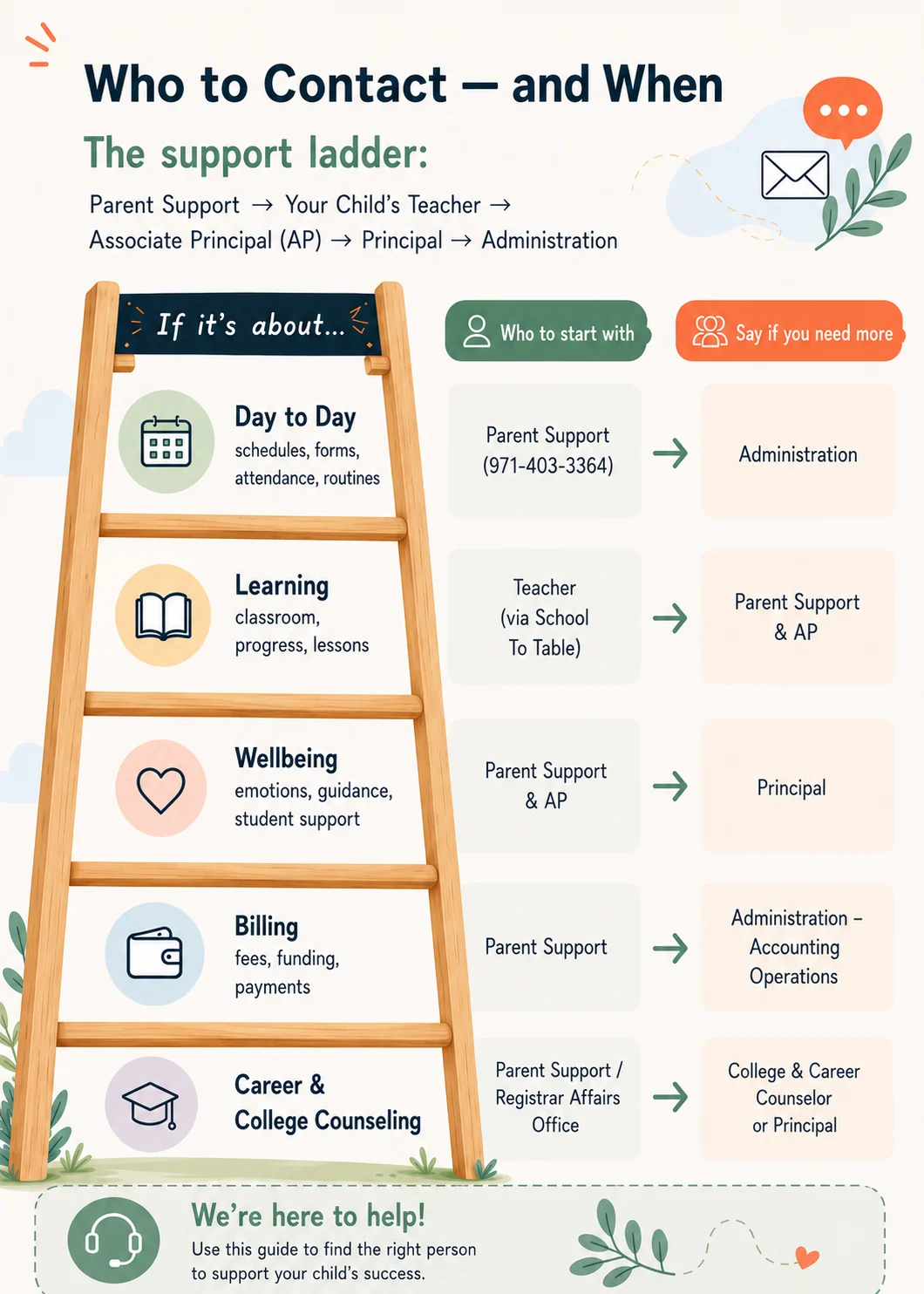
Our Support Ladder — who to contact, when
Open it big, or keep a copy on your fridge.
Chapter 04
Our Leadership Team
Behind every great classroom is a great team. Here’s a quick look at how BMS is structured — from school leadership to the people who keep everything running.
| Role | Who | What They Do |
|---|---|---|
| Principals | Kelly Radigan (Upper School) & Gina Yorko (Lower School) | Overall school leadership for upper and lower school |
| House Leaders | Assistant Principals — one per House | Oversee your child’s House; escalation point for academic or school-life concerns |
| High School Dean | Kristin Chase | Supports high school students academically, socially, and emotionally |
| Parent Support | Lava (Upper School) & Maria (Lower School) | First stop for billing, platforms, scheduling, and operations |
| Operations | Claudia (Billing) Patrick (Admissions) · Nicolas (Tech) | Tuition & billing, admissions & partnerships, tech department |
Chapter 05
Your Onboarding Journey
Joining a new school is a big step — for students and parents — and we’re with you every step of the way. Here’s exactly what to expect.
- Takes 5–10 minutes. Helps us meet state requirements and helps your child’s future teacher understand their needs, interests, and background.
- A short meeting between your family and your child’s chosen teacher. Ask questions and share anything important. Afterwards we confirm enrollment and send an Enrollment Letter.
- After the Meet & Greet, we process the first month’s tuition. After that, tuition is taken automatically on the 1st of each month using your card on file. Mid-month starts are pro-rated. 1:1 Tutoring programs are billed bi-weekly.
- A one-to-one session before your child’s first day. We’ll walk you through final steps and offer to schedule a 25-minute Student Onboarding Session — required for new elementary students, open to all.
Your onboarding checklist
Tick items off as you go — progress saves automatically to this device.
0 of 7 complete
Tip
Need to transfer records?
Chapter 06
Tuition & Billing
We want the billing side of school to be as predictable as everything else. This section explains how tuition is calculated, why every monthly payment is the same size, and what else may appear on your account.
Our Programs & Tuitions
We enroll year-round, and the rates below apply regardless of when your child starts.
What’s included in every program:
Your choice of certified teacher, live daily instruction, our full adaptive learning app suite, bi-annual progress reports and MAP Growth testing, a parent dashboard for assignments and progress, and a support team of certified teachers, academic advisors, and counselors.
How Tuition Is Calculated
Your tuition is set for the full school year — not month by month. We start with the total cost of the academic year, then divide it into equal monthly payments, charged on the 1st of each month from September through June. Every payment is the same amount, from the first month to the last. That’s the whole idea: one number you can plan around.
Why Every Month Costs the Same
Some months have more instructional days than others. November has holidays. December and April have breaks. June wraps up partway through. But your payment doesn’t move because each payment is a portion of the full year’s tuition, not a bill for that particular month’s classes.
If we billed strictly by instructional days, your payments would swing up and down all year: a heavy September, a light November, an unpredictable June. Families would be budgeting around a moving target. Spreading the annual total evenly is simply the calmer way to do it.
Special Education group classes tuition works exactly the same way: $650 a month, 10 times, for a full year of the program.
The June Payment & Your Seat for Next Year
June is not an extra charge — and it does more than close out the year. The June 1 payment is the final installment of your full-year tuition. It also covers the last two weeks of August, when classes resume for the new school year — and it secures your child’s seat for that year. That’s why there is no payment in July or August. After June 1, your next regular monthly payment isn’t due until September 1.
- What it closes: the current school year, through the final day of classes in June.
- What it opens: the last two weeks of August, when the new school year begins.
- What it holds: your child’s seat for the new school year.
- What it isn’t: a bill for the last few days of school. It’s one-tenth of your annual tuition, exactly like every other payment.
When Payments Are Taken
- Your first payment is processed after your Teacher Meet & Greet, once enrollment is confirmed.
- After that, tuition is charged automatically on the 1st of each month, using the payment card on file.
- If your child starts partway through a month, your second payment is pro-rated accordingly.
- 1:1 programs are billed bi-weekly rather than monthly. Your rate and schedule are confirmed during admissions.
- There is no trial period — enrollment begins with your three-month commitment.
Updating Your Payment Method
Call, text, or email Parent Support and we’ll send you a secure link to update your card. Please give us a few days’ notice before the 1st of the month so the change lands before the next charge.
Commitment & Withdrawal
Other Fees You May Come Across
Tip
A question about your bill?
Chapter 07
Navigating State Requirements
We serve K–12 students across all 50 states, with families also joining from Canada, Europe, and South America. Because we’re online, we build connection on purpose rather than leaving it to chance — and we handle the state-by-state paperwork so you don’t have to.
Florida vs. Out-of-State Families
In Florida: We handle everything directly — attendance, records, and all Florida private school requirements on your behalf. No additional steps needed from you.
Other states: Most are just as straightforward — no extra paperwork required. In a small number of states, families may need to notify their State Department of Education or local district that they are homeschooling. We’ll give you clear instructions and are happy to help.
School Choice Funds
Many states now offer school choice funding — tax credits or direct financial support. Depending on the program, funds may be paid directly to BMS or reimbursed to you after you submit an invoice. Either way, we’re here to take care of what’s needed. Full, state-by-state detail lives on our ESA Funding page.
More states are coming — see the ESA Funding page or ask Parent Support for the latest.
Documents We Can Provide
- Notice of Intent to homeschool (where required)
- Individualized Home Instruction Plan
- Quarterly progress reports
- Annual academic evaluations
- Portfolios of student work
- Attendance records
- Transcripts
Not sure what your state requires? A great resource is the Home School Legal Defense Association at hslda.org, or just reach out to Parent Support.
Chapter 08
Your First Day at BMS
You made it — and we couldn’t be more excited! A little bit of prep goes a long way before that first class.
Setting Up Your Workspace
Dedicated Spot
Same place every day — desk, table, or quiet corner.
Good Lighting
Natural light or a desk lamp to reduce eye strain.
Minimal Distractions
Away from TVs, siblings, or other noise if possible.
Tip
Pro tip for younger students
Device & Tech Requirements
A laptop or desktop with a keyboard is required. Phones and tablets aren’t always compatible with our learning apps, and Chromebooks don’t support everything we use.
Laptop
- ✓ Intel Core i5 or i7 processor
- ✓ 8 GB RAM minimum
- ✓ 256 GB storage
- ✓ 1080p display or higher
- ✓ Working camera & microphone
Desktop Computer
- ✓ Intel Core i5 processor
- ✓ 8 GB RAM minimum
- ✓ 500 GB internal storage
- ✓ Windows 10 or above
- ✓ Working camera & microphone
Check your speed at speedtest.net. If it’s slow, try restarting your router or switching Wi-Fi bands before class.
Important
Chromebooks are not recommended
Useful Materials — Interactive Checklist
Everything is online, but a few things make the experience much more comfortable.
Essential
0 of 5 complete
Recommended
0 of 5 complete
Chapter 09
Your First Month at BMS
The first month is about finding your rhythm. Here’s a week-by-week guide to settling in.
Week 1
01 · Get Logged In
Join your first classes, meet your teacher & classmates.
Week 2
02 · Explore
Try the learning apps, get camera-comfortable.
Week 3
03 · Connect
Join a House event, look into electives, meet other families.
Week 4
04 · Belong
Build your routine — you’re part of the BMS family now!
For Parents — First Month Checklist
0 of 5 complete
Kept up to date all year — holidays, breaks, report cards, and community events all live in one place. Bookmark it!
For Students — Ways to Settle In
- Set up your workspace and routine: same spot, same time each day. Get dressed (yes, even for online school!) and have breakfast before class.
- Get comfortable on camera — it helps your teacher support you and builds our community. New students have a two-week grace period to adjust.
- Explore your learning apps outside of class — familiarity helps you focus on actually learning.
- Look into clubs and electives — Spanish, Health & PE, Digital Art, Coding, and more.
- Above all, enjoy it and reach out if anything isn’t working.
Important
Tech trouble? We’ve got you.
Chapter 10
Basic Online Tools
Once onboarding is complete, you’ll receive a welcome email with your child’s login credentials. Make sure they’re logged into each of the tools below before day one.
Google Chrome & Extensions
We recommend Google Chrome — some of our learning apps work best with it. Download it at chrome.google.com. Then add these essential extensions:
- Clever Chrome Extension — instant one-click login to all school apps.
- Grammarly — grammar, spelling, and punctuation as your child writes.
- Read&Write — text-to-speech, word prediction, and reading support.
- BlockSite — helps students stay focused by blocking distracting websites.
Your BMS Gmail
Your child will receive a school email ending in @bms.family. It’s the key that unlocks everything — Clever, Toddle, Zoom, and all learning apps. The very first step on day one: log in and make sure it works.
Tip
Keep it handy
Your Clever Portal
Clever is your child’s launchpad. Bookmark clever.com/in/brilliant-microschool and click “Log in with Google” using the BMS Gmail.
Zoom Education
All live classes happen on Zoom Education — BMS’s secure, school-safe version of Zoom. Students join directly from Clever.
Tip
Do a test run before day one
Chapter 11
Brillow
Brillow is the heart of BMS — the one tool your child opens every day.
Our main platform
Brillow
Brillow is our learning system and your child’s home base — the place where daily lessons, assignments, and resources live, and where learning is made visible as it happens. It’s a structured, mastery-based system that supports diverse learners, gives teachers clear tools, and gives families reliable insight into progress.
What that means for your family.
Fewer surprises
You can see gaps before they become problems, with visibility into learning as it happens.
Clearer decisions
Data-informed insight for teachers, school leaders, and families.
Steadier learning
A consistent structure that helps every student progress.
Why Brillow works the way it does
Our students arrive with very different needs, strengths, and starting points — and many learn best with clear structure and routine. Brillow was built for exactly that. Rather than leaving each teacher to juggle lesson design, differentiation, assessment, and reporting across separate tools, it brings them into one consistent system, so more energy goes to your child and less to admin.
In practice, that means:
- Learning is mastery-based — your child moves forward as they show real understanding, and the system makes that progress visible as it happens.
- Support arrives earlier — because gaps show up clearly, your teacher can step in before a wobble becomes a struggle.
- The structure stays steady — the same familiar rhythm every day, which is especially helpful for neurodiverse learners.
You can read more about the thinking behind Brillow at brilliantmicroschools.org/brillow.
Tip
Getting in
Main Features
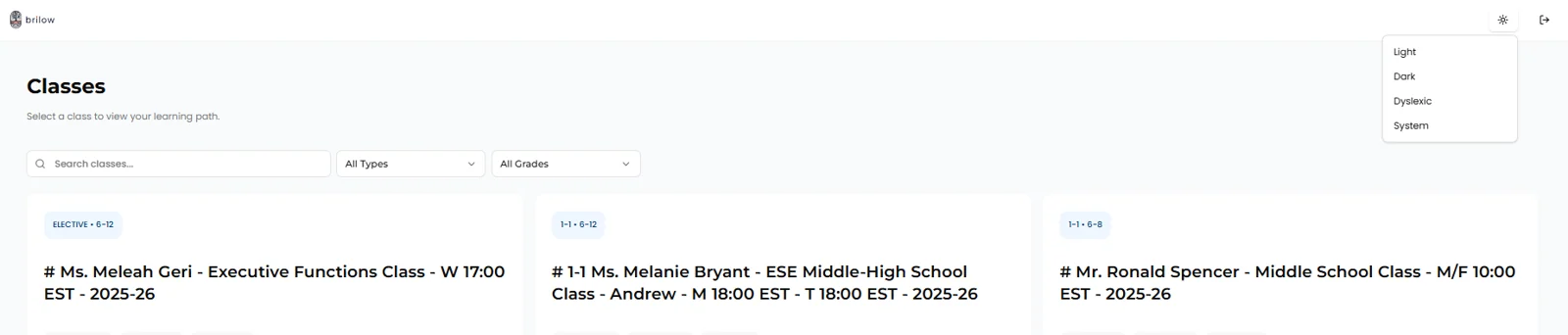
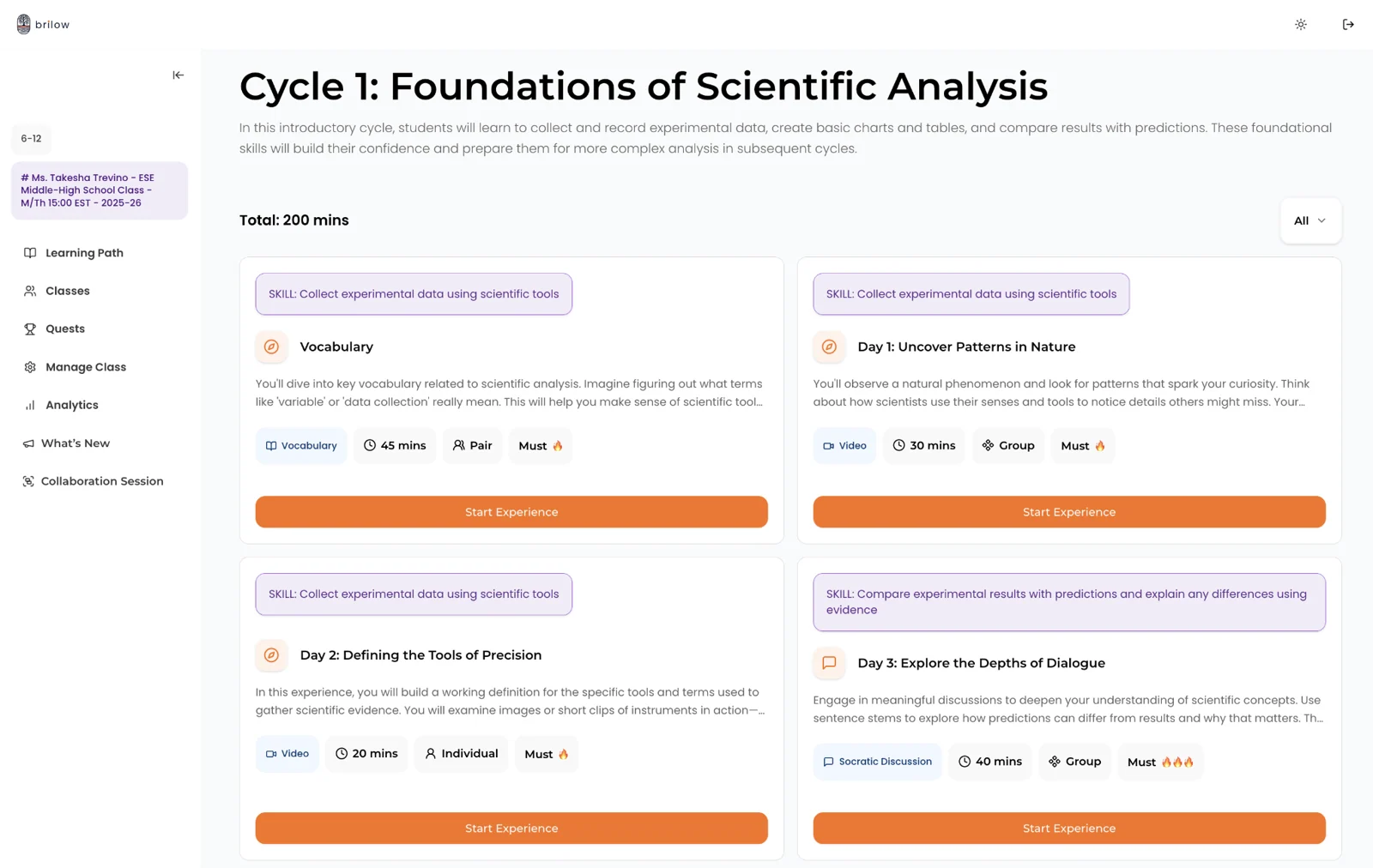
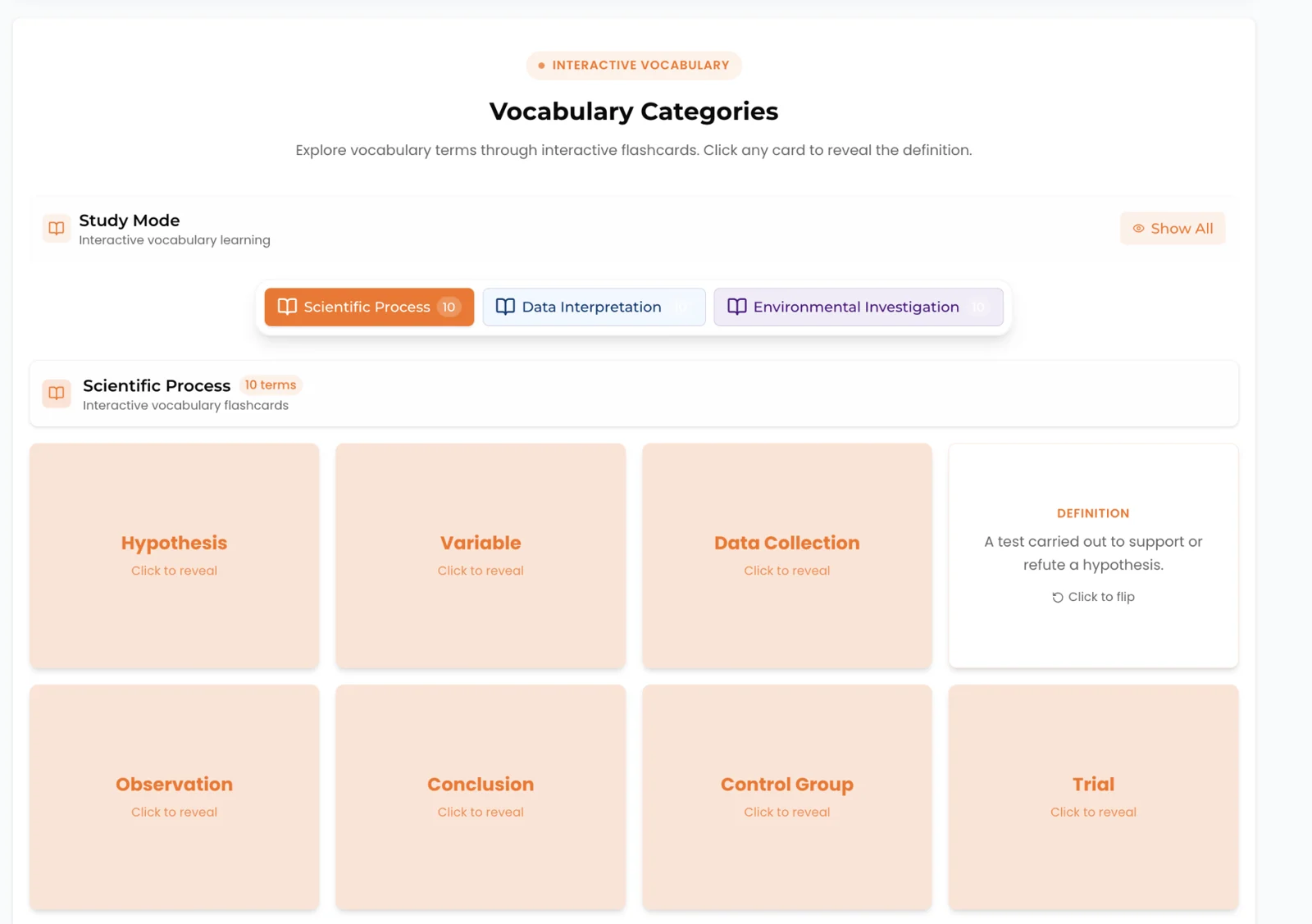
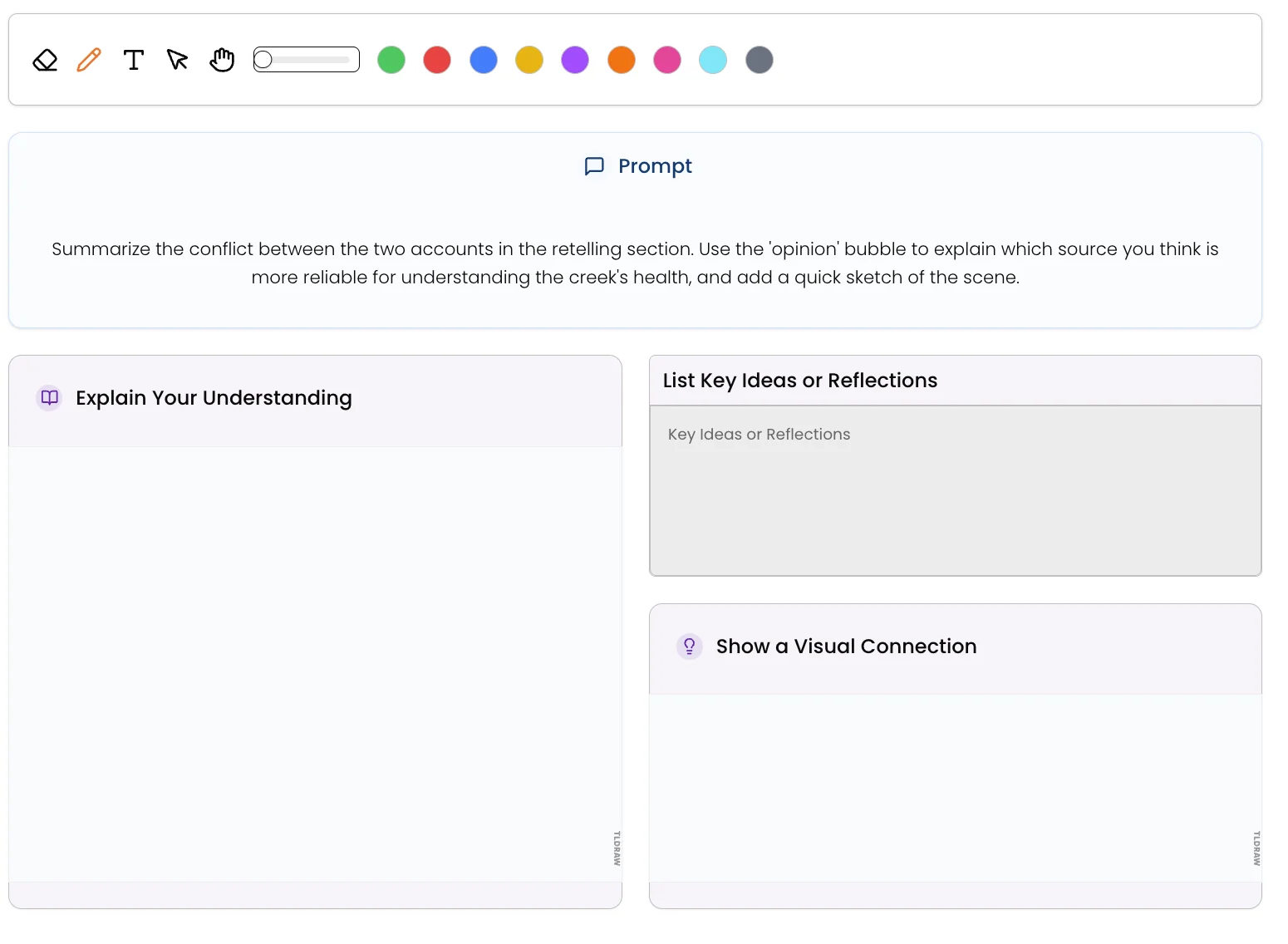
Classes — select a class to view your learning path.
Chapter 12
Supportive Learning Apps
In our school, technology enhances learning without replacing the human connection at the heart of it. We use a carefully selected set of well-tested apps — each one chosen to support your child’s growth in a specific way. Most are accessed through the Clever portal with a single click, and your child’s teacher will guide them through each one in class.
Brillow
Daily lessons, assignments & resources in one place
All students
Toddle
Assignments, progress, portfolios & teacher comms
All students
Toddle Family
Attendance, tasks, reports & direct teacher messaging
All students
IXL
Adaptive practice in Math, ELA, Science & Social Studies
All grades
MAP Growth
Adaptive assessments — taken twice a year, fall & spring
All grades
Canva
Creative projects, presentations & digital design skills
All grades
Track
Toddle & Toddle Family
If Brillow is where the learning happens, Toddle is where you keep track of it. Students use Toddle for assignments, progress, and portfolios; teachers use it to post work and share updates; and families use the companion Toddle Family app to stay connected.
Getting set up. Your child reaches Toddle from the Clever portal, and you’ll receive a sign-up code for your own Toddle Family account during onboarding. Setting it up early is one of the most useful things you can do in your first week. Go to web.toddleapp.com → “Family Account” → “Create Account”.
What you can do in Toddle Family:
- Check attendance under the Attendance tab
- See upcoming tasks and assignments
- Read progress summaries and access term reports
- Message your child’s teacher directly
Reaching your teacher.
Toddle direct message is the preferred way to contact your child’s teacher — homework questions, academic concerns, reporting an absence, or feedback on assignments. It’s always free. Email works as a backup, and you’ll find their address in your child’s Student Timetable.
Tip
Attendance
Did you know
Looking ahead
Practise
IXL Learning
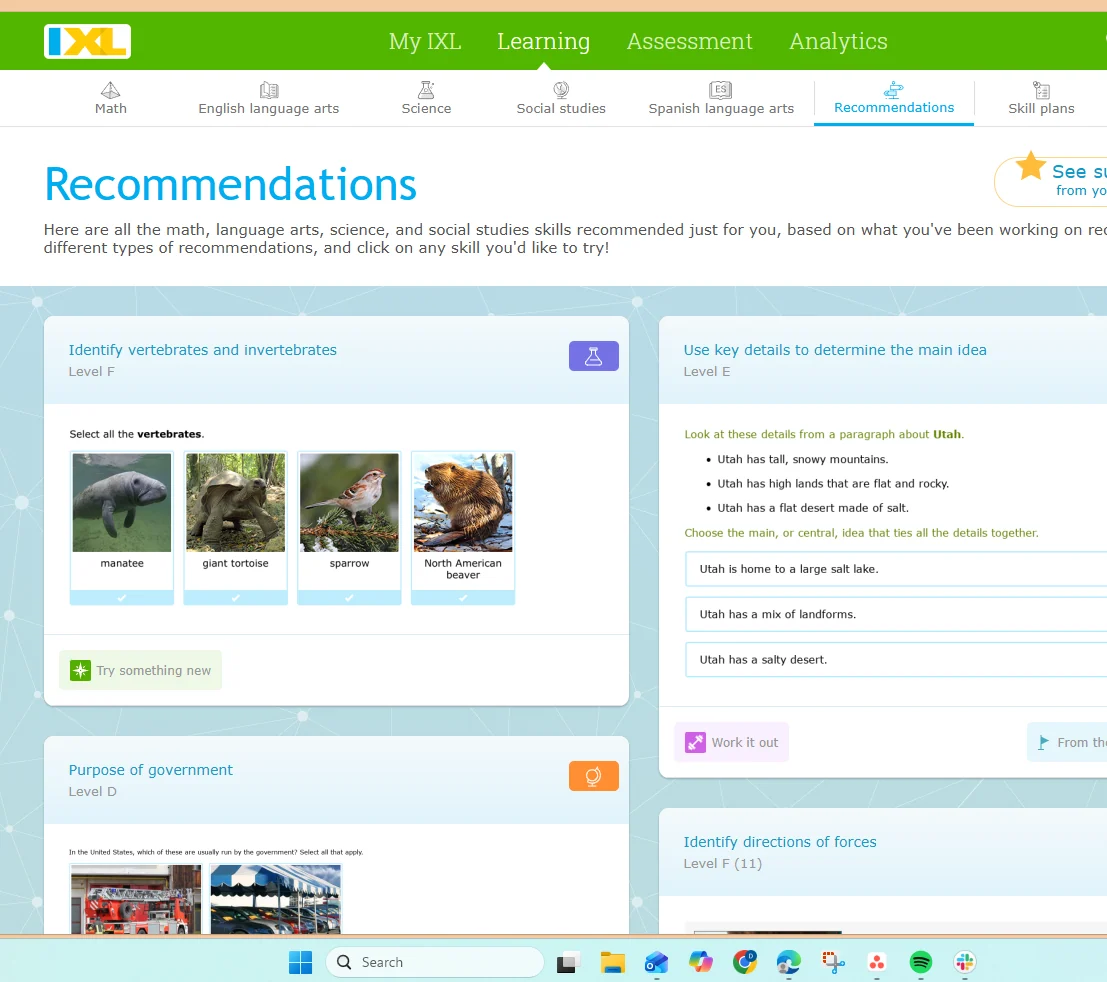
IXL is an adaptive practice platform covering Math, Language Arts, Science, and Social Studies — with over 8,500 skills spanning Pre-K through 12th grade. It adjusts to each student’s level in real time, gives instant feedback, and helps students build confidence by mastering one skill at a time. Teachers use IXL’s analytics to see exactly where each student needs support. Parents can also track progress and celebrate achievements together.
Why is my child seeing work from a different grade level?
This is the question we get asked most about IXL, and the answer is reassuring.
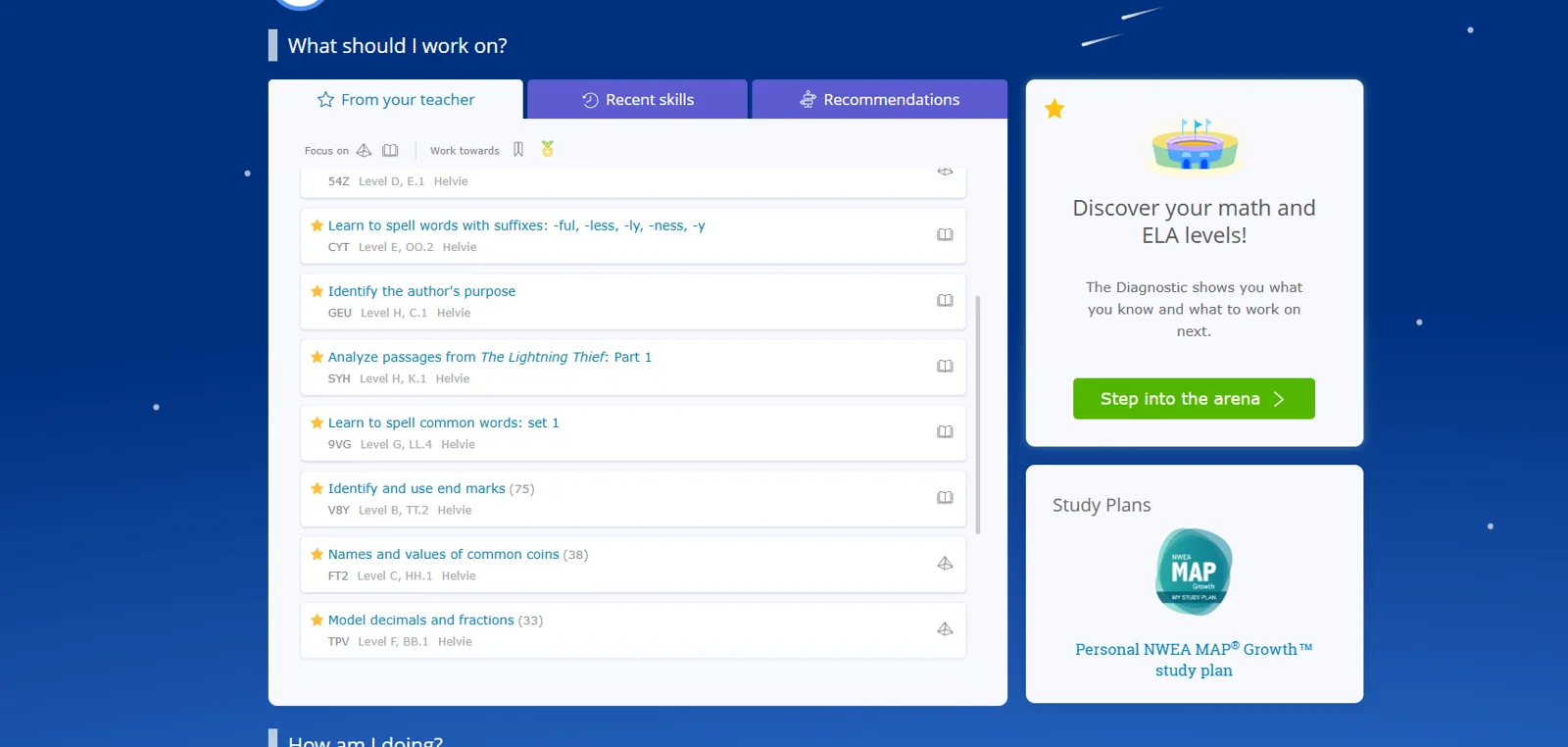
IXL is adaptive, which means it personalises practice around what your child has actually demonstrated they know — not simply the grade they’re enrolled in. It works this out through a Real-Time Diagnostic that runs quietly in the background while your child completes activities, identifying strengths and any areas that need shoring up, then adjusting to give the right level of support at the right moment.
- Content below grade level means IXL is strengthening foundational skills before moving on. That groundwork makes everything after it easier.
- Content above grade level is a good sign — your child is doing well and being stretched further.
It also helps to know that IXL has three different spaces, and they do different jobs:
Diagnostic
Gather a picture of your child’s current level across subjects — think of it as a check-engine scan. It isn’t graded, and there’s no passing or failing. It simply guides what comes next.
Arena
A game-style space where students earn points and climb levels. If your child is doing well, the difficulty can rise quickly, sometimes above grade level. That’s expected, and it reflects their progress.
Practice
The core work — assigned or recommended skills that build mastery. This is where teacher-assigned work appears, usually aligned to current coursework.
So if the dashboard shows a grade level you weren’t expecting, the useful question is: where is this content appearing — Diagnostic, Arena, or Practice? Each one means something different.
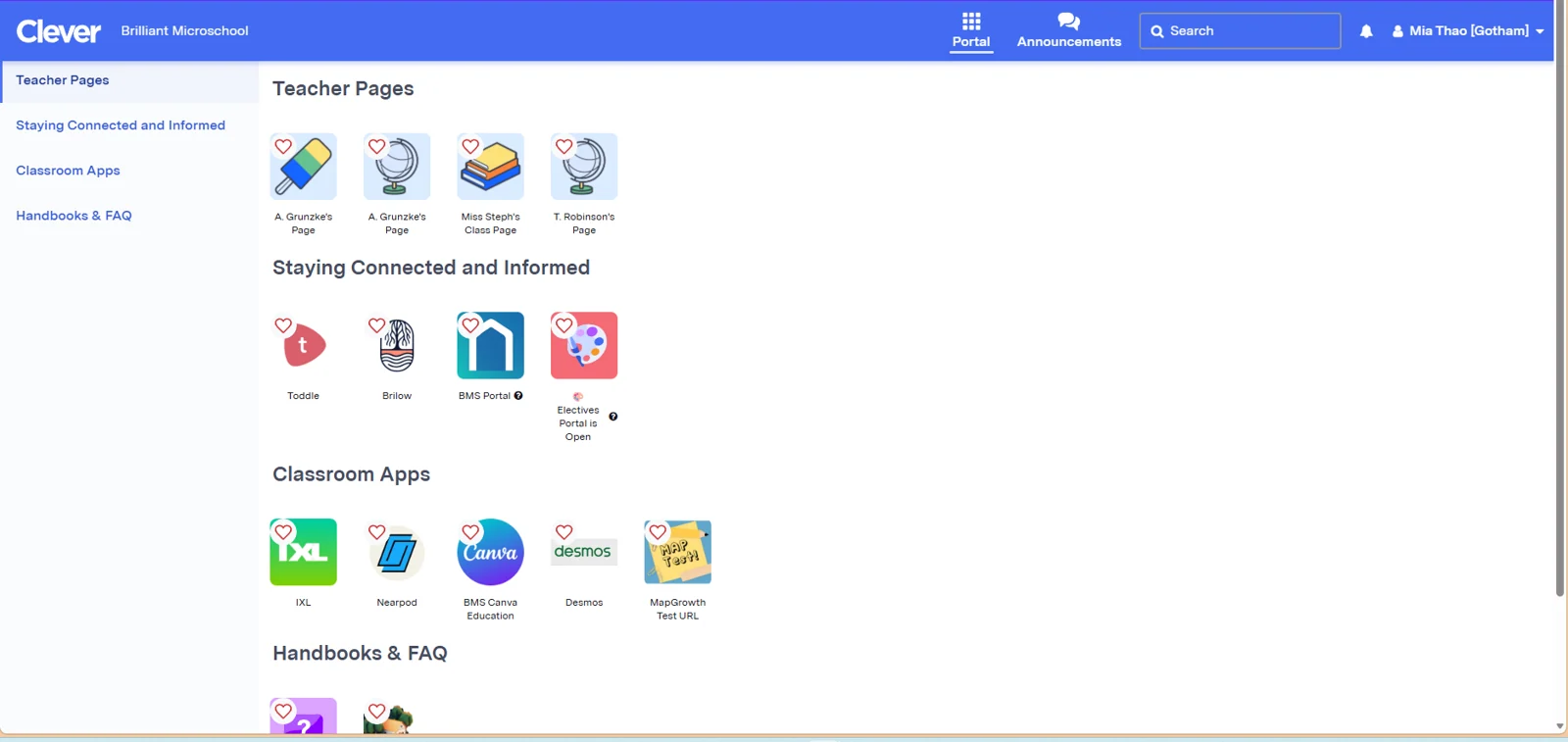
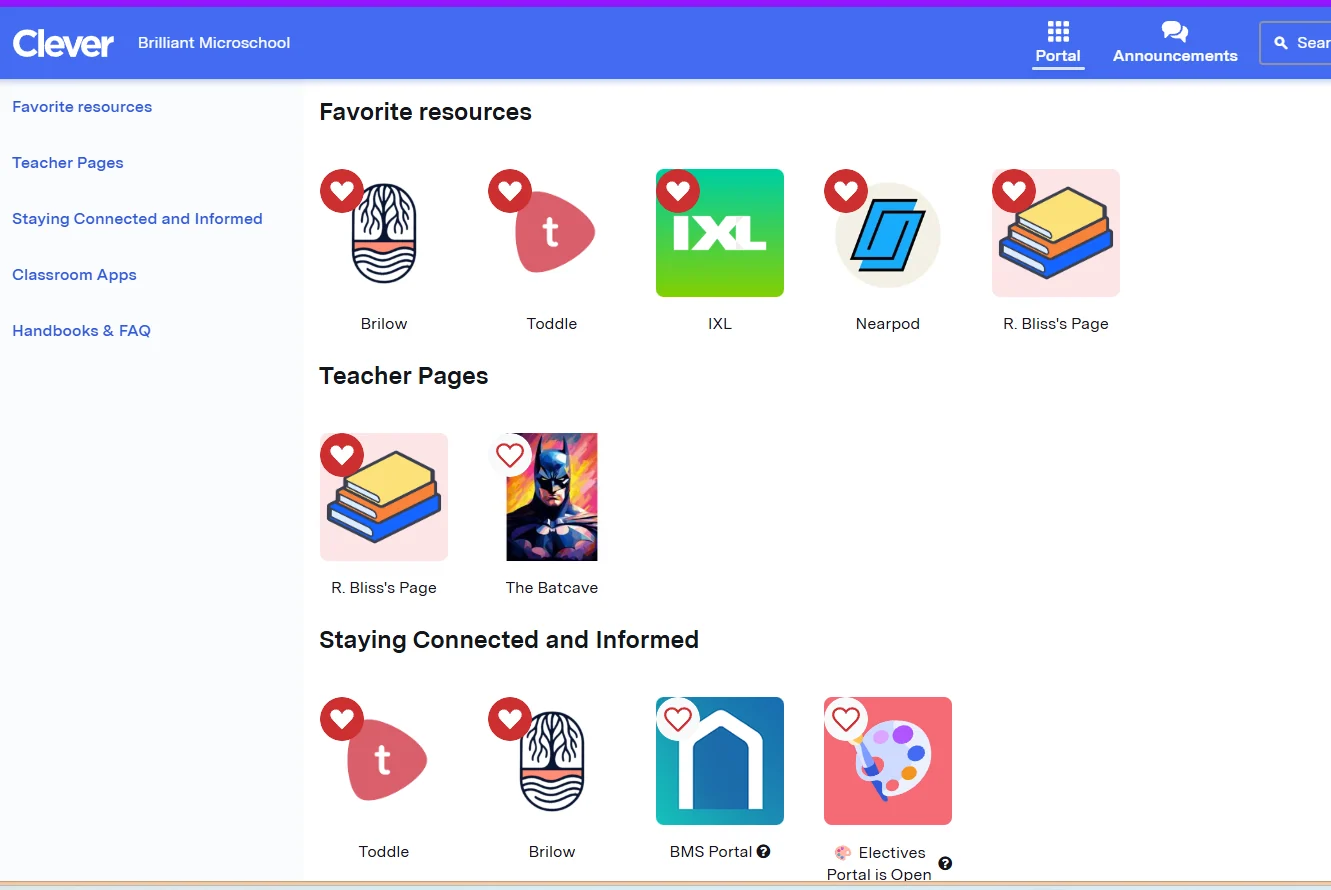
Clever is the launchpad — every app, one click away.
Tip
The best thing you can do at home
Measure
MAP Growth
MAP Growth is a smart adaptive assessment that shows teachers and parents exactly what your child knows and what they’re ready to learn next. The test adjusts with each answer, giving a precise picture of each student’s level. Students take MAP Growth twice a year — once in the fall, once in the spring — so you can clearly see how much they’ve grown.
Create
Canva for Education
Canva for Education gives students a creative space to design and present their ideas visually. From project presentations and posters to infographics and portfolios, Canva helps students build creativity, communication, and digital design skills — all important for 21st-century learners. It’s completely free for students through BMS and accessible via Clever.
Chapter 13
Our Curriculum
Our curriculum is built around one goal: real, lasting growth for every student. Structured, research-backed, and adaptive to how each child learns best.
Core Subjects
All students — General Education (GE) and Exceptional Student Education (ESE) — receive classes in the four core subjects: ELA, Mathematics, Science, and Social Studies & History. GE classes run 3 hours with 8–10 students. ESE classes run 2 hours with 4–6 students, with extra focus on core standards and life skills.
Our Six Principles
Clear Goals
Every unit starts with Power Standards — the key skills students must master.
Real-World Learning
Engaging, interdisciplinary lessons that connect beyond the screen.
Different Paths
Multiple ways to learn and demonstrate knowledge.
UDL
Universal Design for Learning — built-in supports for all learners.
Instant Feedback
Visible learning boards, teacher check-ins, and real-time feedback.
Routines & Systems
EduProtocols and thinking routines let students focus on learning.
BMS Learning Framework
Everything we teach rests on one simple idea: when learning is joyful, well-structured, and built around real understanding, every child can thrive. Our Learning Framework brings that to life in six connected layers — the top four shape how we teach; the bottom two build the life skills that help your child flourish far beyond any single lesson.
- Fun — we put engagement in the driver’s seat, trimming each unit down to a few irresistible essentials so learning feels exciting, not overwhelming.
- Pathways — we design differentiated learning journeys, so every child has a route that fits how they learn best.
- Routines — we teach through the 5E framework and reusable EduProtocols, so students always know what to expect.
- Mastery — we measure progress by real understanding, with mastery-based assessment and the freedom to try again.
- Learner Resourcefulness — we build practical skills and comfort with technology, so students grow more independent and capable.
- Social Emotional Learning — we strengthen self-management through warmth and positive reinforcement, helping your child feel confident, calm, and cared for.
Starting with the End in Mind
Great lessons don’t happen by accident. We plan every unit backwards — beginning with the end goals, which we call Power Standards (the key skills and knowledge we want your child to walk away with). Next we decide how we’ll know they’ve got there — we call these Mastery Checks — and only then do we design the lessons that lead the way. Working backwards means nothing is busywork.
Lessons That Flow: EduProtocols
To build our lessons we use reusable lesson frames called EduProtocols — familiar formats where the routine stays the same but the content changes. Because your child already knows how the activity works, they spend less energy figuring out “what do I do next?” and more energy actually learning and being creative.
Showing What They Know: Performance Tasks
Each unit ends with one or two performance tasks — real-world challenges that ask your child to use what they’ve learned, not just repeat it. We design them with a framework called GRASPS, which keeps each task goal-oriented, rooted in real situations, and open to personal choice in how your child shows their thinking. Tasks come with different formats and optional extensions, so every learner has a way in.
Making Math Come Alive: 3-Act Tasks
- Act 1 — Spark curiosity: we open with a fun, real-world scene (think carnival rides or the Olympics) and invite students to estimate and predict — low pressure, high engagement.
- Act 2 — Make sense of it: we share a little more information and let students explore their own ways to solve the problem, building reasoning, creativity, and confidence.
- Act 3 — Reveal and reflect: we reveal the answer, and students compare, share their strategies, learn from one another, and get real-time feedback.
Universal Design for Learning
Every lesson is designed from the start to be accessible for all students. Teachers offer multiple ways to take in information (video, audio, text, interactive), engage with material, and show what they know (essays, presentations, projects, creative work, verbal responses). We review any IEPs carefully; our universal accommodations are built to support the great majority of learners without requiring individual plans.
Teachers Who Are Vigorous, Not Just Rigorous
Behind every lesson is a teacher who never stops growing. We describe our teachers as vigorous rather than rigorous — endlessly curious, hungry for fresh ideas, and quick to act on feedback. They adapt, they refine, and they meet challenges with warmth and determination.
Chapter 14
One-to-One (1:1) Learning
Most BMS students join one of our two group programs — General Education (8–10 students) or Special Education (4–6 students). For some students, though, a fully individual setting is simply the better fit. That’s our MS 1:1 program: a self-paced, private K–12 option built around live one-to-one time with a certified teacher.
How the week works
1:1 is self-paced learning anchored by two live check-ins a week, each 50 minutes, with a certified teacher who is on camera for every session:
- Session 1 — English Language Arts & Social Studies
- Session 2 — Math & Science
Between sessions, your child works independently through the digital curriculum, video lessons, and adaptive learning apps. Expect roughly 1–2 hours a day for students in Grades K–5, and 2–4 hours a day for Grades 6–12.
Unlike our group programs, MS 1:1 runs year-round. Sessions continue through holiday periods unless you ask to reschedule them.
Who is it for?
MS 1:1 suits students who need personalised support or simply aren’t thriving in a group setting. Families usually come to it for one of these reasons:
- A student receiving Tier 3 support through MTSS, where the most individual attention is the right call.
- A student who is finding a group class hard going — pace, focus, or confidence.
- A student managing health or behavioural circumstances that make a fixed group timetable difficult.
- A self-starter who would rather move at their own speed than wait for the group.
- A family whose schedule or time zone doesn’t line up with our group class times.
General Education 1:1 vs Special Education 1:1
The service, structure, and cost are identical across both. Two things differ:
| MS 1:1 General Education | MS 1:1 Special Education | |
|---|---|---|
| Electives | Two electives included | Not included |
| Leads to | Accredited high school diploma and official transcript | Certificate of completion |
| Transition | — | Can move to MS 1:1 General Education to work toward a diploma, with principal approval |
| At-home support | — | Often benefits from extra parent involvement to build routines |
Everything else — private sessions with a certified teacher of your choosing, the digital curriculum and adaptive software, daily independent study, the parent dashboard, progress reporting, and rolling year-round enrolment — is the same in both.
Tip
Not sure whether 1:1 is right for your child?
Chapter 15
Assessment & Grading
At BMS a grade isn’t about how many assignments got done — it’s about how well your child understands and can use what they’ve learned. We call this mastery-based grading. Students show their understanding through performance tasks and clear rubrics on a simple 0–4 scale (a 4 is Advanced Mastery, a 3 is Meets Grade-Level Mastery).
Course credit is earned at Meets Grade-Level Mastery — around 80% (a B-), or a 3 out of 4 — the point where a student can do grade-level work independently. A score below that is not a failure. It simply means a skill is still developing, and that a little more practice, support, or another attempt will help.
Our promise
Room to try again
Second chances, always. ♥
Chapter 16
High School Program
Our high school program follows the same small-class, teacher-led model as the rest of BMS, with a few important additions:
- Two specialist teachers per classroom (English/Social Studies + Math/Science).
- Maximum of 10 students per room at any time.
- An accredited high school diploma recognized in all 50 states and internationally.
- Electives including Digital Art, Spanish, Health & PE, and Coding.
- Students work toward 9 standards-aligned graduation badges.
Chapter 17
Ready to Move Ahead? The Acceleration Program
Just as we give extra support to students who need it, we make room for students who are ready for more.
Just as we give extra support to students who need it, we make room for students who are ready for more. Because our program is mastery-based, a student who has truly mastered the material doesn’t have to wait for the group.
- Moving at your own pace — with teacher guidance, ready students can move faster and go deeper instead of repeating what they already know.
- High school credit in middle school — in subjects like Mathematics, Foreign Language, and Electives; their high school teacher reviews the standards mastered along with performance tasks and portfolio.
- The Honors pathway — students aiming higher can work toward our 26-credit Honors diploma.
- Dual & concurrent enrollment — dual-enrollment opportunities with select post-secondary partners, and we’re glad to explore aligning with a college your family has in mind where their policy allows.
- Credit for learning already done — strong prior coursework, or a project or artifact that shows mastery of one of our standards, can be reviewed by the teacher.
Tip
Think your child is ready for more?
Chapter 18
Earning a Diploma: Mastery & Credits
An accredited high school diploma, earned by showing what you know.
Credits are earned through mastery, not attendance. Students earn standards-aligned badges by showing what they know through performance tasks (three standards per badge, three badges per subject), and a standard counts as mastered at a score of 3 or higher on our 0–4 scale.
- 24-credit Standard diploma
- 26-credit Honors diploma
- 12-credit Certificate of Completion — an alternative designed for Exceptional Education students
Our Principal can walk you through the options. The full Graduation Requirements, including the credit-by-subject breakdown and community-service hours, are available on request.
Important
Important things to know
Chapter 19
College & Career Planning
From Fridays focused on the future to ASU dual enrollment, we help every student picture what comes next.
Our high schoolers don’t navigate the future alone. BMS provides college and career guidance, one-on-one counseling, transcripts (conditions apply), and a clear graduation pathway built around our graduation badges.
- College & Career Fridays — short weekly activities like interest surveys, job exploration, resume-building, goal-setting, financial literacy, and college research.
- Student check-ins — regular one-on-one time with staff to review progress and decide the next step.
- Family engagement — virtual workshops on academic planning, financial aid, college admissions, and postsecondary decisions.
- Monthly initiatives — each month has a theme, with workshops, guest speakers, and planning activities to match.
| Month | Focus |
|---|---|
| August | Launch Your Future — goal-setting, graduation pathways, and a readiness introduction |
| September | Career Exploration — discovering interests, strengths, and pathways |
| October | College Knowledge — college options and the admissions process |
| November | Financial Literacy & Paying for College |
| December | Building Your Personal Brand — resumes, professionalism, communication |
| January | New Year, New Goals — academic planning and future readiness |
| February | Leadership & Communication |
| March | Real-World Readiness — life skills and workplace preparation |
| April | Decision Season — postsecondary planning and next steps |
| May | Celebrating Growth & Preparing Ahead |
| June | Alumni Panel & Future Planning (Grades 9–12) |
Seniors and their families also get targeted workshops on college applications, FAFSA, scholarships, resumes, interview prep, and transition planning.
ASU Dual Enrollment
Through our partnership with Arizona State University, eligible students can take online, college-level courses while still in high school — exploring possible majors, earning high school elective credit, and building real college confidence. Courses are self-paced and can be started any time of year.
It’s a no-risk model: students only decide after finishing a course whether they’d like to pay for official ASU college credit. There’s a $25 enrollment fee to begin, and a $400 credit-conversion fee only if the student completes the course and chooses to receive official ASU credit.
Our Career Experts
- Alondra Acosta — College & Career Partnerships Coordinator. Dual enrollment, college visits, guest speakers, career events, and family workshops.
- Collene Underwood — College & Career Readiness Counselor. One-on-one and small-group counseling, college applications and admissions support, graduation and postsecondary planning, and career pathways.
Did you know
How families can help
Chapter 20
Getting Back on Track: Credit Recovery
Because credit at BMS is earned by demonstrating mastery — not seat time — there are real ways to recover a credit during the school year.
Sometimes students fall behind on a credit and don’t want to wait until summer to catch up. Because credit at BMS is earned by demonstrating mastery — not seat time — there are real ways to recover a credit during the school year:
- Revise and reassess — a student who hasn’t yet shown mastery can revise their work or take on extra learning, then resubmit.
- Reach the mastery benchmark — credit is awarded at 3 out of 4 or above across the required performance tasks.
- Alternative mastery pathways — in certain situations we can offer other tailored ways to demonstrate mastery.
- Count outside learning — relevant coursework from an accredited school, or a project showing mastery of one of our standards, with teacher review.
If your high schooler is behind on a credit, reach out to their teacher or House Leader. For a fuller catch-up over the break, see Summer School.
Tip
Curriculum Scope & Sequence
Chapter 21
Our Community
BMS may be online, but community is one of the things we’re most proud of. Every student finds their place in their own time.
Many students arrive after school has felt stressful, lonely, or overwhelming — so we create several layers of belonging and let every child find their own way in, at their own pace:
Houses
A smaller home base inside the wider school.
Electives & clubs
Lighter spaces to explore what you love.
Schoolwide traditions
Shared moments across the year.
Regional Thursday meetups
Discover who’s nearby.
Icebreaker Zooms
Meet online before meeting in person.
Field trips
Real-world connection when it’s comfortable.
There’s no single path and no pressure. The goal is steady confidence, not forced participation.
Our Houses
At Brilliant Microschools, we believe that meaningful relationships and a strong sense of belonging are essential to a great school experience. As our school community has grown, our House System has helped us preserve the small, personal environment that makes BMS special.
Every student and teacher belongs to a House—a smaller community within our larger school. Each House is led by an Assistant Principal (AP) who serves as the House Leader and works closely with teachers, students, and families throughout the school year.
Our Houses are named after places of myth, fantasy, and imagination. Each House develops its own unique and inclusive culture while remaining connected to the broader BMS community.
✨ What Does Being Part of a House Mean?
Throughout the year, students have opportunities to build connections and contribute to their House community. This may include:
- Participating in House-wide gatherings and activities
- Sharing their learning and celebrating accomplishments with other students
- Contributing to House traditions, symbols, and culture
- Connecting with students and teachers beyond their immediate classroom
- Building a stronger sense of community and belonging
Behind the scenes, the House structure also gives our teachers a smaller professional community in which they can collaborate, share ideas, discuss student needs, and support one another. This allows us to maintain the personalized approach of a microschool even as BMS continues to grow.
You’ll find out which House your child belongs to during onboarding. House-wide assemblies, symbol-building activities, and shared events run throughout the year, giving your child a familiar community inside the wider school.
Our nine Houses are Atlantis, Hogwarts, Emerald City, Bright Tree Village, Gotham, Dagobah, Camelot, Forbidden Forest, and Ithaca — organised across Upper and Lower School. Each has its own crest, symbols, assemblies, and rhythm, so even as the school grows, your child always has a close-knit group that feels personal.
- Atlantis
- Hogwarts
- Emerald City
- Bright Tree Village
- Gotham
- Dagobah
- Camelot
- Forbidden Forest
- Ithaca
Electives & Clubs
Core Electives — starting September, once weekly, 50 minutes, no extra cost for GE students:
- Spanish
- Health & PE
- Digital Art
- Coding
Clubs — open to all:
- Anime Night
- Art Night
- Pet Night
- Trivia Night
- Creative Writing
- Music Meetup
- Arts & Crafts
- The Chill Zone
Did you know
ESE students and electives
Field Trips & Meetups
Learning goes far beyond the screen. BMS organizes regional in-person field trips across the country — and before each one, we host a pre-field trip icebreaker Zoom so students and families can meet online first. Past trips have included the California Science Center, the Virginia Aquarium, SeaWorld Orlando, and the American Museum of Natural History in New York City.
Parent-hosted meetups run all year too — casual park hangs, playground sessions, and local restaurant gatherings in cities like Chicago, Baltimore, Philadelphia, Phoenix, Boston, Jacksonville, and Sacramento. Every Thursday, families can also join Zoom regional meetups — BMS runs 35–55 of these each year at statewide, city, and town level.
School Events
- All-School Pep Rally
- Annual Talent Show — Stage Masters
- Fall & Spring Project Showcases
- All-School Art Show
- Career Week
- Global Day
- Science Fair
- Graduation Ceremony
Student Government
Coming soon
Student Government is on its way — a real voice for students in the life of the school, with elected representatives from every House. We’re still shaping it with our students, and we’ll share the details here as soon as they’re set.
Did you know
Brilliant Family Circles
Chapter 22
Respectful Learning Environment
A safe and respectful learning environment isn’t just a rule — it’s the foundation everything else is built on.
Code of Conduct
- Punctuality: arrive on time and treat teachers and classmates with respect.
- Classroom etiquette: no loud noises, unrelated multitasking, or eating during live class. Teachers schedule regular breaks (roughly every 50 minutes).
- Appropriate attire: dress freely, but appropriately for a school environment.
- Active participation: complete assignments, contribute, and engage respectfully.
- Respect opinions: listen actively, avoid interrupting, and engage constructively.
- Privacy: personal information (email, phone, address) must not be shared in class.
Every parent and student signs the BMS Honor Code before the school year begins.
Camera Policy
Cameras stay on during live classes — it helps teachers support each student and builds the sense of community that makes BMS special. New students get a two-week grace period to adjust.
Tip
Camera technical requirement
Parent–Teacher Meeting Requests
For general questions, Toddle direct message is the preferred channel. A dedicated private meeting outside of class hours carries a $25 fee to compensate the teacher. Submit requests throughParent Support.
Chapter 23
Multi-Tiered System of Support (MTSS)
Our safety net: when a student needs a little more, we notice early, we tell you, and we put the right support in place — together.
Our MTSS is the safety net that makes sure no child slips through the cracks: when a student needs a little more, we notice early, we tell you, and we put the right support in place — together. Most students stay in Tier 1 all year; the higher tiers simply add more individual attention when it’s needed, and step back down as soon as your child is thriving again.
| Tier | What it looks like | Who leads it | How often you’ll hear from us |
|---|---|---|---|
| Tier 1 — Universal | Great teaching for everyone, with in-class adjustments — encouragement and rewards, differentiated tasks, visual supports, and a Monday-goal / Friday-reflection routine when it helps. | Your child’s teacher | Ongoing updates in Toddle; a parent-teacher conference if a bit more support is needed |
| Tier 2 — Targeted | A tailored Partners in Learning plan with clear goals and strategies — small-group or peer support, an SEL or executive-functioning group, or focused help in a specific skill. | Your House Leader (Assistant Principal) | A planning meeting, then weekly check-ins on progress |
| Tier 3 — Intensive | Our highest level of support: a personal Growth Roadmap and — where it helps — dedicated one-to-one counseling (available at additional cost). | Our Dean | Daily check-ins, daily updates, and a weekly meeting with you |
If we message you in Toddle about a Tier 2 plan and don’t hear back within about 48 hours, Parent Support will call — we never want you out of the loop.
Our promise
The bottom line
Chapter 24
Attendance & Everyday Policies
Showing up matters — and life happens. Here’s how attendance, rescheduling, and off-campus digital life work at BMS.
Attendance & Excused Absences
Our classes are live and interactive, so showing up really does matter. At the same time, our mastery-based model measures progress by understanding rather than seat time, so an occasional absence won’t put your child behind as long as they stay engaged. We run a full school calendar of instructional days a year — meeting state requirements through a mix of live (synchronous) and independent (asynchronous) learning.
To report an absence, message the class teacher via Toddle as early as you can — or call/text Parent Support if you can’t reach the teacher. National public holidays are observed, and we’re always glad to accommodate religious and cultural days; just give the teacher a heads-up in advance.
Cancellation & Rescheduling
One individual session per academic year may be rescheduled without charge with at least 24 hours’ written notice. Group sessions cannot be rescheduled. If a recording is available for a missed session, we’ll share it with a report and any homework — at no charge.
Off-Campus Social Media & Third-Party Apps
BMS doesn’t provide, manage, or monitor access to personal social media accounts or third-party apps (Discord, WhatsApp, Snapchat, TikTok, Instagram, etc.) outside school hours or platforms.
Important
Important
Chapter 25
Summer School at BMS
Learning doesn’t have to stop when the school year ends. Summer School helps students consolidate, catch up, or keep momentum through the summer months.
What Summer School Offers
- Small-class, teacher-led format — 6–10 students, live classes.
- Core subject support in ELA, Math, Science, and Social Studies.
- Flexible scheduling designed to work around summer plans.
- Access to the same learning apps and tools as the regular program.
Who It’s For
- Students who want to get ahead before the new year.
- Students who need to revisit specific topics or skills.
- Families who prefer keeping a school routine through summer.
- New families who want a gentler introduction before the full year.
Sunny reminder
How to enroll
Chapter 26
Family Documents & Downloads
A quick library of the policies, forms, and references you may want to save or share. Everything opens in a new tab.
Tip
Need something else?
Chapter 27
Frequently Asked Questions
Got questions? You’re not alone. Search below or browse by category — if yours isn’t here, just call or text.
About the School
Billing & Payments
Technology & Apps
Academic Questions
Community & Wellbeing
Our promise
Still have questions?